


It’s my experience that having a few essential apps can greatly enhance your trip. The apps you use at home may not work or be reliable in South Korea, as many services are region-specific and often require local alternatives.
I’ve compiled a list of must-have apps that I find useful when visiting South Korea.
Once you book your flight, I recommend installing these essential applications so you can familiarize yourself with them, utilize them for planning, and avoid any potential credit card issues.
TL;DR – Must-Have Apps for Traveling Korea
Heading to South Korea? Download Naver Map, Papago, and a ride hailing app like Uber before you go. Grab an eSIM (don’t rely on airport Wi-Fi), and grab a T-money card for buses and subway. Alos some cash to top off your card at convenience stores. These apps save time, prevent confusion, and make your trip way smoother.
Top 4 Must-Have Apps for Traveling in South Korea
1. Naver Navigation/Map App
Many people rely on Google Maps, but it’s not ideal for navigating Seoul. While it can help with Itinerary planning, Naver is the must-have app for getting around.
It’s free on the Apple Store, and you don’t need an account unless you want to bookmark locations, which requires a Korean phone number.

To change the language to English, click the menu icon, the three bars in the search bar, settings, the little dial in the upper right corner, and select English.
You can search for locations and get detailed directions for public transport, driving, walking, or cycling. The app even combines bus and subway routes when needed, showing transfer points and costs.
To use Naver Map, simply type your destination in the search bar, choose your preferred route, and follow the detailed directions for public transportation, driving, walking, or cycling.
Naver Map also has pre-set categories for nearby spots like cafes and restaurants. While I can’t bookmark routes without an account, I pin my preferred routes and unpin them after use.
Despite occasional language challenges, it’s a reliable app for navigating South Korea with ease.
The app supports multiple transport modes, offering directions for driving, walking, and public transit, with real-time schedules for subways and buses.
2. SUBWAY KOREA
The Subway Korea app provides detailed and real-time information about the subway systems in major South Korean cities, including Seoul, Busan, Incheon, and others.
It is especially popular among tourists and locals who rely on the subway for daily commutes or travel.
I use this essential must-have app alongside Naver. When my journey mainly involves the subway, I prefer using this app for that part of the route. It’s visually clearer and easier to follow.
To use alongside Naver, I find the subway stations I’m traveling between. Then, I enter them into the app to find the best route, since there are sometimes multiple options.
I chose to include this in the must-have apps for travel because it is not only easy to use and provides basic info about the stations.
It also includes the subway systems in other cities you may travel to, including Busan, Daejeon, Daegu and Gwangju.

Although some could contend that you do not need a subway app, I find them useful.
It helps me manage my time more effectively and is visually straightforward to follow, which makes traveling the subway easier.
3. Papago Translation
Naver’s Papago translation app is essential for traveling around Seoul. It is commonly referred to as just ‘Papago’ and is widely used in South Korea.

Developed by Naver, it integrates seamlessly with the Korean language and is regularly updated for precision.
The must-have app is widely considered the best for translating Korean, offering a more accurate translation over alternatives.
It excels in handling Korean idiomatic expressions, slang, and complex grammar, making it more reliable for colloquial speech.
Papago was specifically designed for translating Asian languages, with a strong focus on Korean, Japanese, and Chinese.
With features like voice and image translation, it’s especially useful for travelers in Korea who need real-time assistance.
Other features include conversation, study camera, and type to translate which may come in handy when using a navigation app.
While Papago is highly accurate, some communication barriers may still arise due to the complexity of the Korean language and cultural nuances and context that can be difficult to fully capture in translation.
4. UBER
This must-have essential app is likely already on your phone, and you’ve probably used it before. It works the same in South Korea, but it calls a taxi, not a private driver.
Payments are made directly through the app, and just like back home, it provides an estimate of the ride’s cost, duration, and route.
Taxis are usually quick to arrive and reasonably priced. In cities like Busan, where attractions are spread out, using the app can save you time and eliminate the hassle of language barriers by allowing you to input your destination directly in English.
Payments are made directly through the app, and just like back home, it provides an estimate of the ride’s cost, duration, and route.
Alternative Must-Have Apps
Although I haven’t personally used these must-have apps, I’ve done some research, and they frequently come up as essential recommendations for apps when traveling in South Korea.
While I can’t speak from personal experience, I’ll share what I’ve found. From what I’ve gathered, they’re also recommended and seem to make life a lot easier for both locals and travelers. Ultimately, it comes down to personal preference.
5. KAKAO MAP
Kakao Map is an alternative must-have navigation app in South Korea, created by the same company behind KakaoTalk. It offers detailed maps, real-time traffic updates, and turn-by-turn directions for driving, walking, or public transport.
Much like Naver, it’s widely used for its accuracy and easy-to-use interface. Plus, it works seamlessly with other Kakao apps, making it even more convenient for locals.
It also provides English-language support, which makes it accessible for non-Korean speakers. Whether you’re driving, walking, or using public transport, the app is designed to guide you smoothly through your journey.
6. GOOGLE TRANSLATE
Google Translate is one of the most widely used translation tools, supporting over 100 languages.
It’s highly convenient for travelers, offering text, voice, camera, and even handwriting translation features.
Although it’s not as focused on Korean as apps like Papago, it still provides a good translation experience for most languages, including Korean.
Google Translate is useful for translating simple phrases, signs, menus, and even entire paragraphs of text on the go.
Google Translate can struggle with complex sentences and may provide less accurate translations for idiomatic expressions or nuanced phrases, especially when translating between languages that are structurally different (like Korean and English).
However, its translation quality has improved significantly over time, and it’s still useful for most everyday phrases and simple translations needed for travel. Because I think there are fewer misunderstandings, I prefer Papago.
Plus, Koreans will know that when you mention Papago, you’re referring to the app for communication, as they use it themselves.
7. Kakao Taxi
Kakao Taxi or Kakoa T is the essential app that Koreans use to request a taxi. It has a multitude of options/services that you will most likely never use as a tourist.
Also, if you are going to use this essential app, make sure to set up your account, link your credit card and verify your phone number. Once in Seoul, you will not be able to do that.

It appears to be easy to use and quite similar to Uber. Simply open the app, choose the taxi icon, enter your pick-up and destination, and begin your search.
There are various taxi options available based on your needs. For a standard ride, you’ll pay the driver directly, either in cash or by card.
The other options may cost more, but they can accommodate passengers with luggage or larger groups. Choose the option that best suits your situation.
Since I’m already familiar with Uber and prefer not to deal with setting up a foreign app with my credit card, I stick with using Uber.
8. KTX Korail app
Despite the fact that some users swear by this app, I cannot really endorse it. It seems that the payment process is the primary source of frustration for many.
Apparently, you can’t create an account without a Korean ID and phone number, so you’ll have to purchase tickets as a guest.
The only times to get tickets in advance are on weekends or major holidays when there is a significant demand from locals making online reservations, which causes the tickets to sell out rapidly.

Depending on when you are traveling, the best option is to purchase a round-trip ticket in person at Seoul Station or another KTX station a few days in advance. Tickets are sold one month in advance on the app.
9. MiseMise
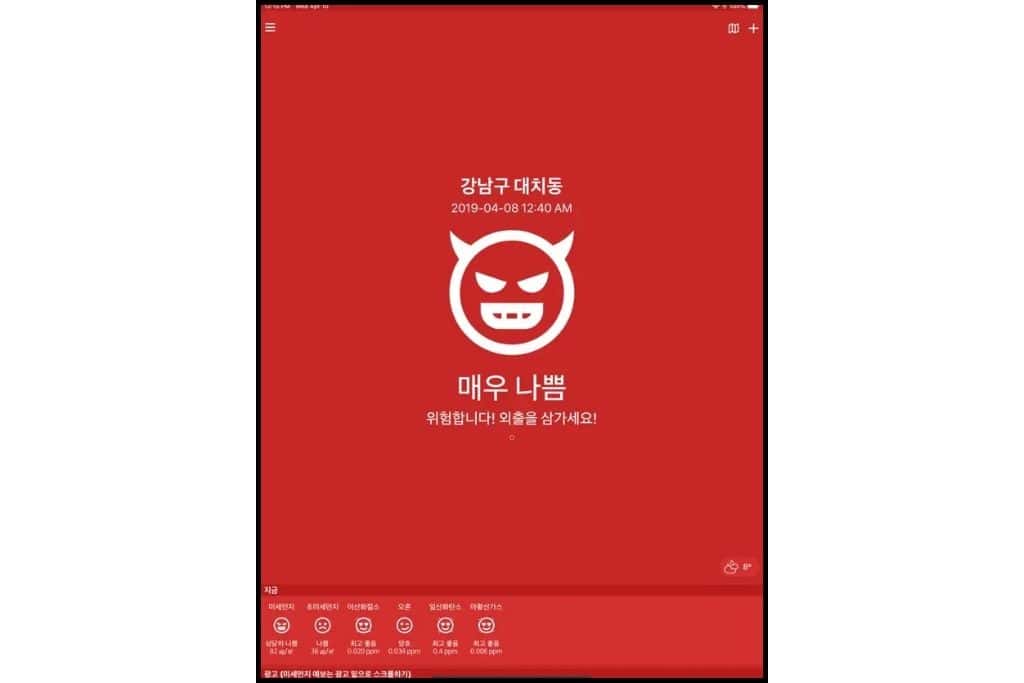
Misemise is a must-have Korean app for the air quality. It is so easy to use, you do not need to change the language.
Fine yellow dust, which is frequently transported by winds from China, can worsen the quality of the air in Korea, particularly in the spring.
You may get headaches, bloody noses, and even feel as though you have the flu when the air quality is poor.
You will see a face and a color when you open the app. You can make plans based on the color and expression, which will indicate whether the air quality is good, decent, bad, or really bad.

10. TLOCKER
Tlocker is a must-have app for those looking to store luggage or other personal items at subway stations.
It helps you locate available lockers in the nearest station based on your location.
Tailored for Seoul’s subway network, T-Locker offers access to over 5,500 unmanned lockers across 279 stations on Lines 1 to 9, including key areas like Myeongdong and Seoul Station, making it an invaluable resource for both tourists and locals.
The app also simplifies storage management, allowing you to check locker availability, open and close doors with a touch, and even make reservations in advance without physically visiting the lockers.
Additionally, it supports quick and easy payments through various methods, including credit card, bank transfer, and mobile payment.
Although similar lockers can be found in other cities such as Busan and Gwangju, the T-Locker app is exclusive to the subway system in Seoul and cannot be used in other areas.
11. Catchtable app
This practical app is only available for iPhones. CatchTable is an app that allows users to easily make restaurant reservations in South Korea.

With both Korean and English versions available, the app helps foreign visitors book tables at top restaurants without the language barriers of phone calls or emails.
It features real-time reservations, customizable search filters, and even discounts at Michelin-listed restaurants in Seoul as well as Busan.
FYI some restaurants may only appear on the Korean version of the app and not on the English version
12. Happy Cow
Happy Cow is a popular app for finding vegan, vegetarian, and plant-based dining options around the world. It offers a searchable directory of restaurants, cafes, and grocery stores, providing reviews, ratings, and photos from users.

The app helps travelers and locals alike discover new places to eat, with features like filtering by cuisine type, distance, or dietary preferences.
I wasn’t aware of the Happy Cow app, so I haven’t used it myself. After researching it online, it seems to be an excellent resource for vegetarian and vegan travelers, particularly in areas where finding plant-based meals can be more challenging.
12. Shuttle for Food Delivery
Shuttle is a bilingual food delivery app serving communities in Seoul, Osan, Pyeongtaek, Daegu, and Busan.
It offers a selection of food from top local restaurants, which users can have delivered to their home, office, or other locations.
The app allows users to browse restaurants, order in English or Korean, and even pick up food themselves.
Other Essential Travel Must Haves
TMoney Card
The T-Money card is essential for navigating South Korea, offering smooth access to buses, subways, and even select taxis and convenience stores.
You can buy it at convenience stores such as GS25, CU, or 7-Eleven, as well as at subway stations.
Reloading is easy and cash-only; simply use the recharge machines at subway stations or ask a cashier at a convenience store for a top-up. It’s a hassle-free way to travel without the need for cash or exact change!
eSIM
An eSIM is a convenient, digital alternative to traditional SIM cards, allowing you to stay connected while traveling in South Korea without the hassle of swapping physical cards.
Most modern smartphones are compatible with eSIM technology, so it’s a quick and easy solution for international travelers.
When you use an eSIM, you’ll connect directly to South Korea’s local mobile networks with a Korean eSIM. Popular carriers like SK Telecom, KT Corporation, and LG U+ offer support for eSIM technology.
You can activate your eSIM before you even leave home and enjoy fast, reliable mobile service during your entire trip!
Staying connected in Korea is a lot easier with a SIM card or eSim
👉 Grab your SKT Unlimited Local Data & Voice Calls Sim Airport Pick up HERE
OR
Grab your Korea eSIM with SKT Unlimited LTE data + Voice
SIM Card
A physical SIM card for South Korea is another convenient option for staying connected during your trip.
You can purchase a SIM card at airports, convenience stores, or mobile carrier shops in major cities.
There are different types of SIM cards available, including data-only SIM cards, which are great for travelers who don’t need a phone number, and regular SIM cards that provide both data and voice services.
To activate your SIM card, you’ll need to insert it into your phone, and it’s typically ready to use immediately.
Remember, your phone should be unlocked to use a Korean SIM card, and data plans can be topped up at convenience stores or online.
F.A.Q.
Naver Map or KakaoMap are must-haves. Google Maps doesn’t work well here, especially for walking or bus directions. I personally rely on Naver—it’s surprisingly accurate, even on tiny mountain roads.
Yes, but it may be limited in smaller cities. In larger cities, Uber connects to taxis, not private drivers. In Seoul and Busan, I have used Uber in Busan with no issues. If you use KakaoTaxi, make sure to download at home to add your credit card.
Papago wins this one. It’s built for Korean and often more accurate than Google Translate. I use it constantly for signs, menus, and those “uh-oh” moments when I need help.
Yes—especially for maps, taxis, and real-time bus routes. I suggest getting an eSIM before you land, so you’re connected the moment your plane touches down
Most tourists don’t need a local payment app. Instead, focus on having a working debit or credit card, and download the app that comes with it (like your US bank’s app). Also, grab Currency Converter so you can double-check prices on the go. Read about money mistakes to avoid here.
Wrapping Up: Must-Have Apps for Your South Korea Adventure
To sum up, navigating South Korea becomes much easier and more enjoyable with the right apps in hand. Whether you’re searching for vegan-friendly restaurants or streamlining your transportation, these tools can significantly enhance your travel experience, ensuring you make the most of your time in this dynamic country.
As you plan your itinerary and seek local tips, remember to download these must-have apps before you go. Equipped with the right technology, you’ll be ready to explore all that South Korea has to offer with confidence!
💡 Planning Your Trip to Korea?
Don’t stop at apps—make sure you know where to go and what to do, too!
👉 Check out my Free Things to Do in Seoul and Where to Stay in Seoul for local tips, and can’t-miss spots.
Save them now so you’re not googling from a café with spotty Wi-Fi later!